
Download Diglot – Bilingual Writing Assistant, AI Translation, and Plagiarism Checker
Overview
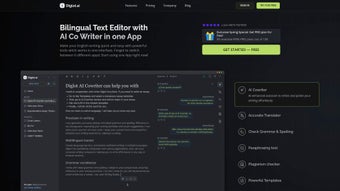
Diglot is a subscription‑based web application that positions itself as a one‑stop bilingual writing solution for students, researchers, marketers, and anyone who needs to create content in more than one language. Powered by a suite of AI‑driven tools, Diglot blends co‑writing, grammar and spelling correction, paraphrasing, synonym discovery, citation generation, summarisation, and a robust translation engine that supports 24 languages. The platform’s rich‑text editor lets users switch effortlessly between languages while preserving formatting, and the built‑in plagiarism checker guarantees originality before a document is published.
Diglot’s architecture follows SOC 2 and GDPR compliance, meaning that user data is encrypted, stored securely, and never sold to third parties. Because it runs entirely in the browser, there is no heavy desktop installation, and the service is accessible from any modern operating system via a secure HTTPS connection. Whether you are drafting a research paper, preparing marketing copy, or simply replying to an email in a foreign language, Diglot promises to streamline the entire workflow—from the first idea to the final citation—while keeping the user interface clean and intuitive.
Core Features & AI Toolkit
- AI Co‑Writing: Real‑time suggestions that adapt to your style, tone, and the language you are working in.
- Grammar & Spelling Checker: Context‑aware error detection for both English and 23 additional languages.
- Paraphrasing & Synonym Search: Generates alternative phrasings while maintaining meaning, ideal for avoiding repetition.
- Citation Generator: Automatically formats references in APA, MLA, Chicago, and Harvard styles.
- Summarisation Engine: Condenses long articles or research papers into concise abstracts.
- AI‑Powered Translation: Supports 24 languages with neural‑network accuracy, enabling seamless bilingual drafts.
- Plagiarism Checker: Scans content against billions of web pages and academic databases.
- Rich Text Editor & Templates: Drag‑and‑drop formatting, pre‑built templates for essays, reports, and emails.
- Browser Extensions: Chrome, Firefox, Edge, and Safari plugins that bring Diglot’s tools directly into web‑based text fields.
- Data Security: SOC 2 and GDPR‑aligned encryption, two‑factor authentication, and regular security audits.
The integration of these tools means that users no longer need to toggle between multiple apps or copy‑paste text into separate translators and checkers. For example, a researcher can write a paragraph in English, click the “Translate” button, and instantly receive a polished French version that already passes the built‑in plagiarism scan. The AI engine also learns from user corrections, so the more you write, the more accurate the suggestions become. This continuous feedback loop is a major differentiator compared to generic translation websites that lack contextual awareness.
Installation, Usage, and Compatibility
Because Diglot is a cloud‑native service, there is no traditional “install” process. Users simply create an account at diglot.com, choose a subscription tier, and start writing directly in the web interface. The onboarding wizard walks new users through setting their primary language, preferred citation style, and any accessibility options such as high‑contrast mode. For teams, an admin console allows the creation of shared workspaces, role‑based permissions, and centralized billing.
While the core experience lives in the browser, Diglot also offers native desktop wrappers for Windows 10/11, macOS, and Linux via Electron, providing offline caching for drafts when internet connectivity is intermittent. Mobile users can download companion apps for Android 12+ and iOS 14+, which sync seamlessly with the web version via encrypted WebSocket connections.
Supported Operating Systems: Windows, macOS, Linux, Android, iOS, Chrome OS, and any device with a modern browser (Chrome, Edge, Firefox, Safari). All platforms benefit from automatic updates—Diglot pushes new AI models and security patches to the cloud, ensuring that every user works with the latest features without manual downloads.
Security‑focused users will appreciate the two‑factor authentication (TOTP or SMS) and the ability to generate single‑use API keys for integration with third‑party content management systems. Data is stored in encrypted volumes within ISO‑27001‑certified data centers, and GDPR‑compliant data‑subject requests can be fulfilled within 48 hours via the account dashboard.
Pros, Cons, FAQ & Final Verdict
Pros
- All‑in‑one bilingual workflow eliminates the need for multiple subscriptions.
- AI translation supports 24 languages with near‑human quality.
- Integrated plagiarism and paraphrasing tools maintain originality.
- Secure, SOC 2/GDPR‑compliant infrastructure protects sensitive documents.
- Browser extensions and desktop wrappers keep the experience consistent across devices.
Cons
- Subscription pricing may be high for casual users who need only occasional translation.
- Heavy reliance on internet connectivity for full AI functionality.
- Advanced citation styles (e.g., Vancouver) are not yet supported.
Frequently Asked Questions
Is there a free trial for Diglot?
Yes, Diglot offers a 14‑day free trial with access to all premium features. No credit card is required to start the trial.
Can I use Diglot offline?
The desktop wrappers cache drafts locally, but AI‑driven tools such as translation, plagiarism checking, and summarisation require an internet connection.
How does Diglot protect my data?
All data is encrypted at rest and in transit, stored in SOC 2‑certified data centers, and processed in compliance with GDPR. Two‑factor authentication is optional for added security.
Which languages are supported for translation?
Diglot currently supports 24 languages, including English, Spanish, French, German, Mandarin, Japanese, Korean, Arabic, Portuguese, Russian, Italian, Dutch, Swedish, Danish, Norwegian, Finnish, Polish, Czech, Greek, Turkish, Hindi, Bengali, Vietnamese, and Indonesian.
Is there an API for developers?
Yes, Diglot provides a RESTful API with token‑based authentication, allowing developers to embed translation, paraphrasing, and plagiarism checking into custom applications.
Conclusion & Call to Action
Overall, Diglot delivers a compelling blend of AI‑enhanced writing assistance and bilingual capabilities that few competitors can match. Its unified interface reduces the friction of jumping between separate translators, grammar checkers, and citation managers, making it especially valuable for academic and professional environments where accuracy and originality are non‑negotiable. While the subscription cost may deter occasional users, the productivity gains for power users—researchers, multilingual marketers, and content teams—justify the investment. If you regularly produce documents in more than one language or need a reliable plagiarism‑free workflow, Diglot is worth a try. Start your free 14‑day trial today, and experience a truly integrated bilingual writing environment.



.png)



